Accessibility Permissions
tarmac relies on the macOS Accessibility API (AXUIElement) to inspect and manipulate windows. Without this permission, tarmac cannot:
- Read window positions and sizes
- Move or resize windows
- Detect window focus changes
- Query minimum window sizes
How tarmac checks permissions
At startup, tarmac calls AXIsProcessTrustedWithOptions to check whether it has Accessibility access. If the check fails, it logs a warning and continues running — but it won't be able to manage windows.
The check happens once at launch. If you grant permissions while tarmac is already running, you'll need to restart it.
Granting access
macOS Ventura and later (System Settings)
- Open System Settings
- Go to Privacy & Security → Accessibility
- Click the lock and authenticate
- Click + — a Finder dialog opens
- Press Cmd+Shift+G to open the "Go to Folder" field. Finder doesn't show
/usr/localor/opt/homebrewby default — this shortcut lets you type a path directly. - Type the path to the tarmac binary:
- Homebrew:
/opt/homebrew/bin/tarmac - Manual install:
/usr/local/bin/tarmac
- Homebrew:
- Select
tarmacand click Open - Make sure the toggle is on
macOS Monterey (System Preferences)
- Open System Preferences → Security & Privacy → Privacy
- Select Accessibility in the sidebar
- Click the lock and authenticate
- Click + and add the tarmac binary
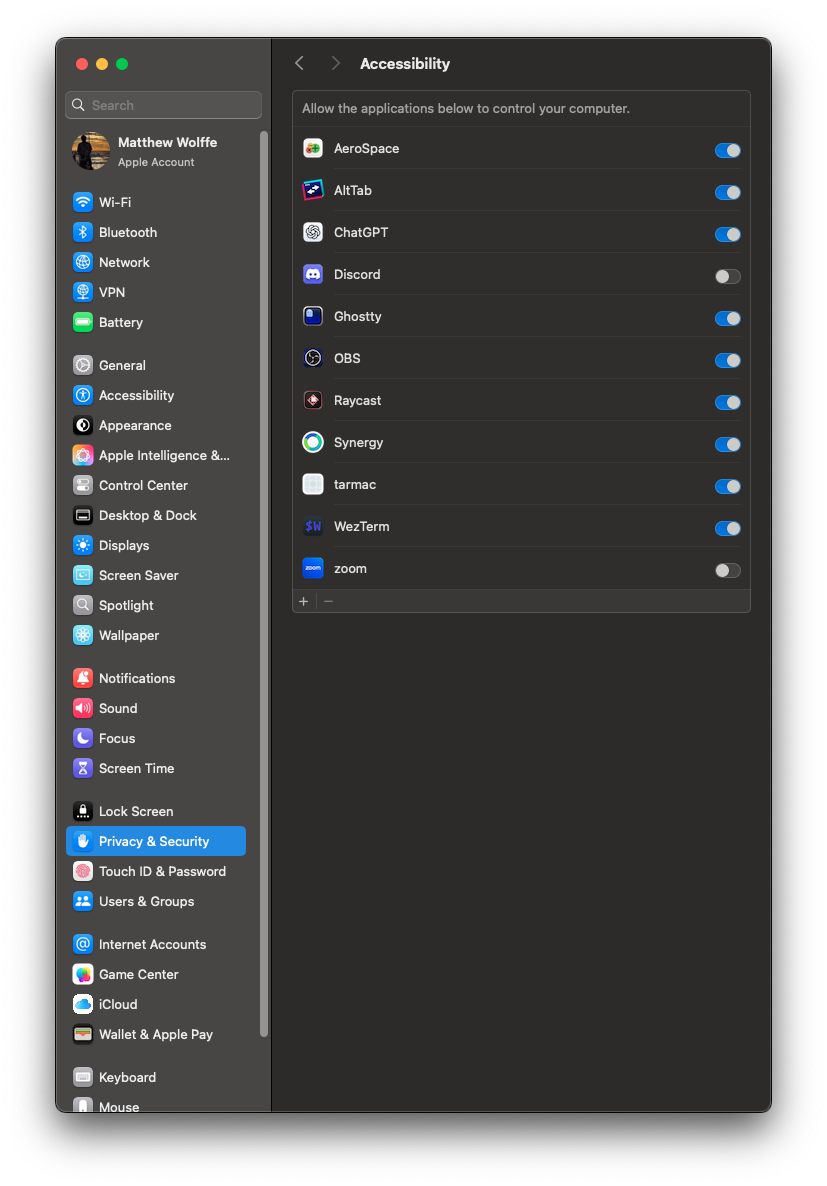
Permission revoked after rebuild
macOS ties Accessibility permission to the binary's code signature. If you rebuild tarmac from source, the new binary has a different ad-hoc signature, and macOS silently revokes the permission.
Symptoms:
- tarmac starts but doesn't tile anything
- Log shows
AXIsProcessTrusted: false
Fix: remove the old entry from Accessibility settings and re-add the new binary.
If you're rebuilding frequently during development, you can use tccutil to reset the permission database (requires admin):
sudo tccutil reset Accessibility com.gardesk.tarmac
Then re-grant access through System Settings.
ers also needs Accessibility
If you're using ers for window borders, it also needs Accessibility permissions. Add the ers binary to the same Accessibility list. ers needs it to detect focus changes and query window geometry.
Troubleshooting
"tarmac is not in the Accessibility list"
If you installed via Homebrew, the binary may be at a different path (e.g., /opt/homebrew/bin/tarmac). Add that path instead.
"Permission granted but windows still don't tile"
- Restart tarmac after granting permission
- Check that the correct binary is listed (not an older version)
- Run
RUST_LOG=tarmac=debug tarmacand look for AX-related errors in the output