First Run
Grant Accessibility permissions
tarmac uses the macOS Accessibility API to move and resize windows. You must grant it permission before it can do anything.
- Open System Settings (or System Preferences on older macOS)
- Navigate to Privacy & Security → Accessibility
- Click the lock icon to make changes
- Click + and add the
tarmacbinary (typically/usr/local/bin/tarmac) - Ensure the checkbox next to tarmac is enabled
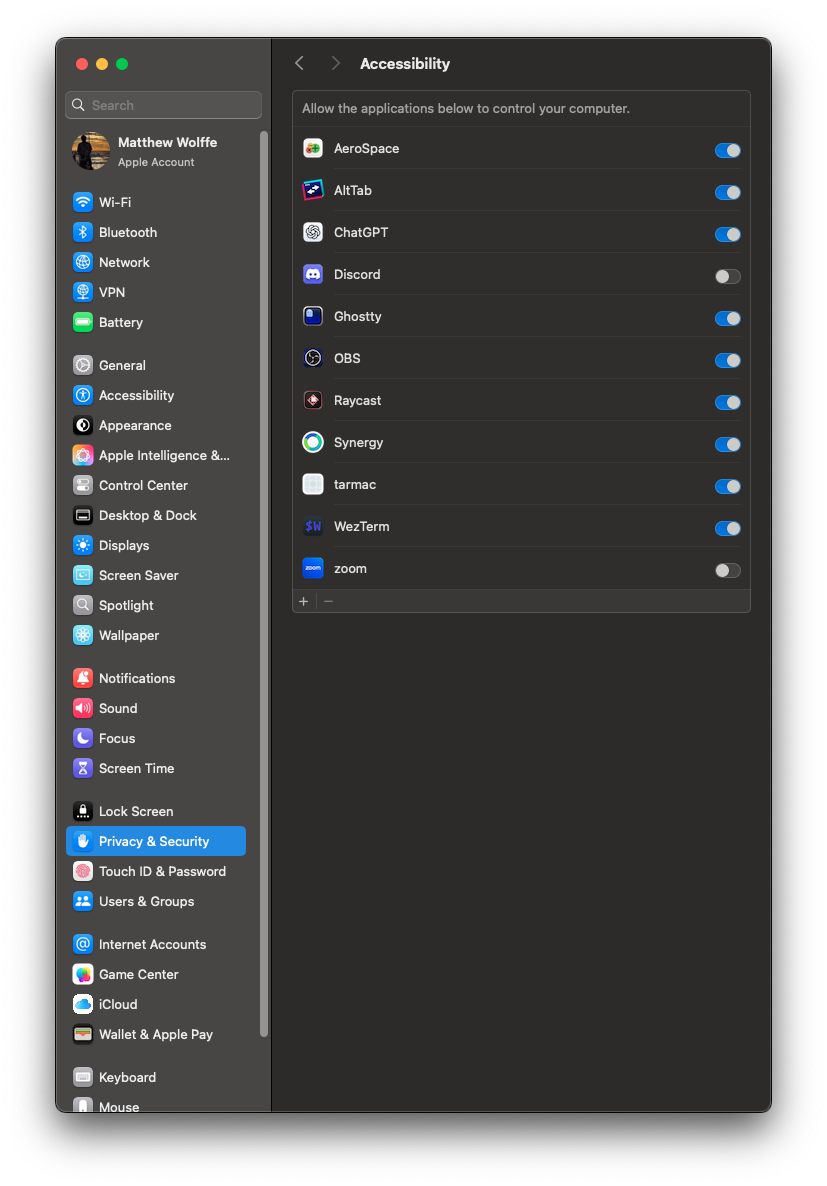
If you skip this step, tarmac will detect the missing permission at startup and print a message telling you to grant it. It will not crash, but it won't be able to manage any windows.
If you've rebuilt tarmac from source, macOS may revoke the permission because the binary signature changed. You'll need to remove and re-add it.
Starting tarmac
Run the daemon from a terminal:
tarmac
tarmac runs in the foreground and logs to stderr. You'll see output like:
INFO tarmac: config loaded from /Users/you/.config/tarmac/init.lua
INFO tarmac: IPC server listening at /tmp/tarmac-you.sock
INFO tarmac: found 2 monitors, managing 8 windows
Running in the background
To run tarmac as a background process:
tarmac &>/dev/null &
Or use a login item / launchd agent to start it automatically on login. A basic plist:
mkdir -p ~/Library/LaunchAgents
Create ~/Library/LaunchAgents/com.gardesk.tarmac.plist:
<?xml version="1.0" encoding="UTF-8"?>
<!DOCTYPE plist PUBLIC "-//Apple//DTD PLIST 1.0//EN"
  "http://www.apple.com/DTDs/PropertyList-1.0.dtd">
<plist version="1.0">
<dict>
  <key>Label</key>
  <string>com.gardesk.tarmac</string>
  <key>ProgramArguments</key>
  <array>
    <string>/usr/local/bin/tarmac</string>
  </array>
  <key>RunAtLoad</key>
  <true/>
  <key>KeepAlive</key>
  <true/>
  <key>StandardOutPath</key>
  <string>/tmp/tarmac.out.log</string>
  <key>StandardErrorPath</key>
  <string>/tmp/tarmac.err.log</string>
  <key>EnvironmentVariables</key>
  <dict>
    <key>RUST_LOG</key>
    <string>tarmac=info</string>
  </dict>
</dict>
</plist>
Load it:
launchctl load ~/Library/LaunchAgents/com.gardesk.tarmac.plist
Default config
On first run, if ~/.config/tarmac/init.lua doesn't exist, tarmac uses built-in defaults:
- Modifier key: Command
- Gaps: 0 (no gaps)
- Focus follows mouse: enabled
- Mouse follows focus: enabled
- Borders: disabled (set
border_width > 0to enable) - Terminal:
open -na WezTerm
All default keybindings are listed in Default Binds.
Stopping tarmac
Press Ctrl+C in the terminal where tarmac is running, or:
kill $(pgrep tarmac)
If using launchd:
launchctl unload ~/Library/LaunchAgents/com.gardesk.tarmac.plist
When tarmac exits, windows return to their previous floating state — macOS handles them as normal.
Logging
Control log verbosity with RUST_LOG:
RUST_LOG=tarmac=debug tarmac     # verbose
RUST_LOG=tarmac=info tarmac      # normal (default)
RUST_LOG=tarmac=warn tarmac      # quiet
This uses the standard Rust tracing crate filter syntax.